REVIEW · OSAKA
Japan eSIM (3 to 30 days, up to 60GB)
Book on Viator →Operated by Xplori · Bookable on Viator
Japan eSIMs can sound boring. This one is practical, fast, and perfect for the part of the trip that usually goes sideways: getting online right away.
I like that you can choose 3 to 30 days (so you’re not paying for more time than you need) and that activation is handled through email and a QR code, not a counter. I also like the idea of staying on 4G/5G for day-to-day plans, with a fallback after the high-speed limit. The main thing to watch: it only works if your phone supports eSIM, and the text includes a speed cap (and then 3G), so heavy users may need to manage data.
No pickup, no meetup, no language maze. You order, get what you need in your inbox, scan the code, and you’re connected within minutes. For most Osaka-focused trips (and even beyond), that’s exactly the kind of low-stress tech help that makes the first days feel smoother.
In This Review
- Key points I’d plan around
- What This Japan eSIM Gives You (3–30 Days, Up to 60GB)
- How Activation Works: Email, QR Code, Connected in Minutes
- Using Data in Osaka: Maps, Messaging, and “Where Do We Go Next?”
- The High-Speed Limit and What “Switches to 3G” Really Means
- Phone Compatibility: The Real Gatekeeper for eSIM
- When Activation Doesn’t Go Perfect: What to Do First
- Price and Value: Why $5 Can Make Sense
- Where This eSIM Fits Best: Who Should Book
- Quick sanity check: What you should verify before you rely on it
- Should You Book This eSIM for Japan?
- FAQ
- How long is the Japan eSIM valid for?
- How much data is included?
- Does it include 4G or 5G?
- Will I have to pick up the eSIM in Osaka?
- How do I activate the eSIM?
- What happens after I use the high-speed data?
- Can I cancel for a refund?
Key points I’d plan around

- QR code activation by email so you’re not stuck hunting for a SIM shop on arrival day
- 4G/5G data where available for maps, messaging, and ride-hailing
- 3–30 day options with an overall total of up to 60GB
- Speed cap then 3G after your high-speed allowance is used
- Nationwide coverage is promised across Japan’s provinces
- Support is there if setup is delayed (one case needed an email to get it working)
What This Japan eSIM Gives You (3–30 Days, Up to 60GB)
This isn’t a guided experience with stops. It’s a stay-connected tool, and that matters because Japan runs on location-based planning. Whether you’re bouncing between neighborhoods in Osaka or doing day trips, you’ll want steady data for maps, transit ideas, and quick messages home.
The plan comes in 3 to 30 days, and the total offering is up to 60GB. In plain terms, longer stays cost you more time, but the flexibility is useful. If you’re doing a short weekend sprint, a 3-day option keeps the spend sensible.
You’re not limited to Osaka either. The description says the data covers all Japanese provinces, which is what you want if your itinerary stretches beyond one city. One note to stay sharp: the extra details also mention Canadian provinces, which is clearly an inconsistency in the wording. I’d treat the Japan coverage claim as the key point, but double-check your actual plan details after you order so you don’t rely on the wrong line of text.
You can also read our reviews of more tours and experiences in Osaka.



How Activation Works: Email, QR Code, Connected in Minutes
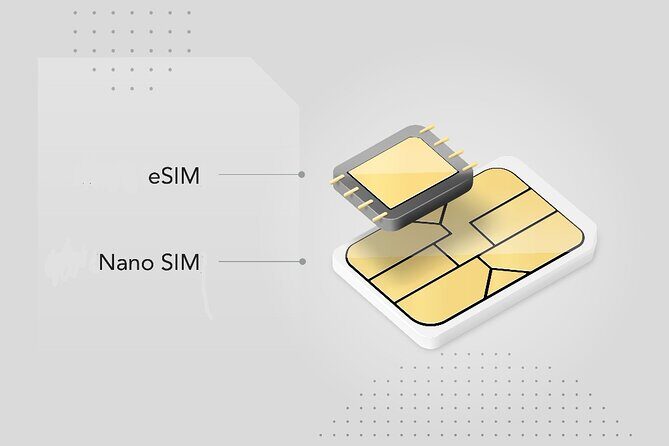
The big win here is setup. After you order, you get the eSIM by email. Then you scan the QR code and activate the profile. The promise is simple: you can be connected within minutes.
That’s exactly what you want on a trip. Airport SIM setups often come with lines, counter confusion, and the need to translate instructions while you’re already tired from travel. This approach keeps the process in your control, before you even leave home.
Two practical tips I’d follow:
- Activate when you have time (not when you’re rushing to meet someone or catch a train).
- Make sure your phone is on a stable connection and has enough battery for the setup.
Also, the product is digital only—no pickup point in Osaka. That’s perfect for travelers who hate last-minute errands, but it does mean you need to have the QR code ready before you’re out and about.
Using Data in Osaka: Maps, Messaging, and “Where Do We Go Next?”

In a place like Osaka, you’ll use data constantly in small ways: checking walking routes, translating street signs, confirming platform info, and finding the right entrance to a station. This eSIM is built for that kind of everyday use, powered by 4G/5G where available.
If you’re used to relying on Wi-Fi, you’ll probably notice the difference quickly. Japan can have spotty connectivity depending on where you are, but mobile data turns “Wait, where is it?” into “Got it” in seconds.
The local-rates angle is part of the value story. Instead of pay-as-you-go fear, the plan is meant to feel predictable while you plan your days. You’ll also be able to keep friends and family in the loop without hunting for a café hotspot.
One more reality check: speed isn’t the same everywhere. 5G coverage depends on the area and carrier availability. You still get 4G, which is plenty for maps and messaging. If your priority is navigation, you don’t need headline speeds—you need reliable access.
The High-Speed Limit and What “Switches to 3G” Really Means
Every data plan has a limit; the question is how quickly you hit it. This one uses a straightforward model: you get a capped amount of high-speed data, and after that, the speed drops to 3G.
In daily use, the change usually shows up most for tasks like heavy video, large photo uploads, or frequent refreshes of map layers. For basic navigation and messaging, 3G can still keep you connected, but it may feel slower.
Here’s a concrete clue from a past 30-day experience: the plan’s daily allowance was described as about 1.5GB per day, and that was considered enough for normal use. Your usage may be different—especially if you stream or upload a lot—but the takeaway is encouraging for most travelers.
If you want to avoid hitting the cap early:
- Use Wi-Fi when you can for app updates and large downloads.
- Turn off background data for apps that chew through data.
- Download key offline maps before you leave, if your phone supports it.
Even if you do reach the slower stage, the plan’s intent is that you still won’t lose connectivity completely—just at reduced speed.
Phone Compatibility: The Real Gatekeeper for eSIM
This eSIM isn’t for every phone, and the list of compatible devices is clear. The guidance calls out eSIM-ready phones like iPhone XS and later, Pixel 3 and later, and Samsung S20/S21/Fold.
If you don’t fall in that range, you may not be able to add the eSIM profile at all. That’s why it’s worth checking before you buy, not after.
If you’re unsure, the provider suggests contacting them in advance. That’s good advice because eSIM support can be confusing, especially if you have a dual-SIM setup or an older model.
One more point that’s easy to overlook: eSIM setup happens on your device, not theirs. So you need your phone to be ready for configuration, and you need enough time to get the profile activated properly.






When Activation Doesn’t Go Perfect: What to Do First
Setup usually works smoothly, and the QR method is designed for exactly that. Still, technology can be stubborn.
One practical example: on the first day, an activation issue required emailing the company, and the response came back quickly with help to get it turned on. That tells me the support channel matters—and if your eSIM doesn’t activate right away, you shouldn’t just wait it out for days.
If you run into problems:
- Confirm your QR code details and follow the activation steps carefully.
- Check whether your phone has eSIM profile space and whether the profile is activated.
- Contact the provider promptly if you don’t get service.
This approach keeps you from losing half a day of wandering with no maps.
Price and Value: Why $5 Can Make Sense
The price listed is $5.00 per person. On its face, that’s shockingly low compared to the typical “airport SIM tax” feeling. The description specifically positions it as cheaper than buying a SIM at the airport and helps you avoid activation delays and language barriers.
Now, value isn’t just the sticker price—it’s what you avoid:
- No airport line.
- No counter back-and-forth.
- Less stress on arrival.
- Faster route-finding from the moment you land.
For a traveler using mobile maps and messaging daily, connectivity quickly becomes a “time savings” purchase. If you spend even an hour sorting out a SIM while jet-lagged, the eSIM starts to feel like a bargain.
This is also a good option if you’re traveling with someone else who might not want to handle a physical SIM swap. You order digitally and each person handles their own eSIM activation.
That said, it’s not the best choice for everyone. If you already have an excellent international roaming plan you trust, or if your phone can’t use eSIMs, the “cheap” part doesn’t matter.
Where This eSIM Fits Best: Who Should Book
This is a strong match if you:
- Have a phone that supports eSIM (the listed iPhone, Pixel, and Samsung models are the key clues)
- Want instant connectivity for maps and messaging
- Are visiting Japan from a single base like Osaka, with possible day trips
- Prefer setup before arrival instead of dealing with counters
It’s also a good choice for travelers who want to keep things simple: your eSIM arrives by email, you scan, you connect. No physical logistics in Japan.
It may not be the best fit if you:
- Need a physical SIM pickup or you’re arriving without access to your email
- Don’t have an eSIM-compatible phone
- Plan very heavy data use (video streaming and uploads) and want to avoid any speed throttling
Quick sanity check: What you should verify before you rely on it
Before you trust it for the whole trip, do these checks:
- Your phone model supports eSIM (use the examples like iPhone XS+ and Pixel 3+ as your baseline).
- You can access your email where the QR code arrives.
- You understand the high-speed cap concept: after your allowance, speed drops to 3G.
- Coverage is meant to cover Japan’s provinces, even though there’s conflicting wording about provinces elsewhere.
This is the difference between a smooth trip and a stressful morning.
Should You Book This eSIM for Japan?
If you have an eSIM-compatible phone, I think this is an easy yes—especially if you’re starting your trip in Osaka and want to get maps and messaging working quickly without fuss.
Book it if you like predictable connectivity, simple activation, and a setup that doesn’t depend on finding the right shop after you land. The low price and the “connected within minutes” promise make it a smart value play for most day-to-day travel needs.
Skip it if your phone can’t use eSIM or if you need a physical SIM you can hold in your hand. Also be honest about your data habits: if you stream a lot or upload constantly, you may feel the speed drop after the high-speed allowance.
In short: this is the kind of small, unglamorous purchase that keeps the trip moving.
FAQ
How long is the Japan eSIM valid for?
You can choose options ranging from 3 to 30 days, depending on your trip length.
How much data is included?
The plan is described as up to 60GB total, with high-speed data capped at the mentioned amount.
Does it include 4G or 5G?
Yes. It includes 4G/5G where available during your journey.
Will I have to pick up the eSIM in Osaka?
No. It is a purely digital product, and you receive it by email after ordering.
How do I activate the eSIM?
After you receive it by email, you scan the QR code to activate the eSIM profile. The connection is expected within minutes.
What happens after I use the high-speed data?
After you use the high-speed allowance, your data speed switches to 3G.
Can I cancel for a refund?
Yes. You can cancel up to 24 hours in advance for a full refund, based on the experience’s local time.
If you tell me your phone model and roughly how many days you’re in Japan, I can suggest which duration option is most likely to fit your style of use.